Grab a cookie!
By using this website, you agree to our use of cookies. We use cookies to provide you with a great experience and to help our website run effectively.
Consent Selection
Details
  • Necessary cookies help make a website usable by enabling basic functions like page navigation and access to secure areas of the website. The website cannot function properly without these cookies.
    • Learn more about this provideropens in a new window
      cf.turnstile.uThis cookie is used to distinguish between humans and bots.
      Maximum Storage Duration: PersistentType: HTML Local Storage
    • Learn more about this provideropens in a new window

      Some of the data collected by this provider is for the purposes of personalization and measuring advertising effectiveness. The provider may use the IP Addresses for ads measurement and ads personalization.

      rc::aThis cookie is used to distinguish between humans and bots. This is beneficial for the website, in order to make valid reports on the use of their website.
      Maximum Storage Duration: PersistentType: HTML Local Storage
      rc::cThis cookie is used to distinguish between humans and bots.
      Maximum Storage Duration: SessionType: HTML Local Storage
    • Learn more about this provideropens in a new window
      bcookieUsed in order to detect spam and improve the website's security.
      Maximum Storage Duration: 1 yearType: HTTP Cookie
      li_gcStores the user's cookie consent state for the current domain
      Maximum Storage Duration: 180 daysType: HTTP Cookie
    • SESS#Preserves users states across page requests.
      Maximum Storage Duration: 1 dayType: HTTP Cookie
    • CookieConsent [x5]Stores the user's cookie consent state for the current domain
      Maximum Storage Duration: 1 yearType: HTTP Cookie
    • __cf_bm [x2]This cookie is used to distinguish between humans and bots. This is beneficial for the website, in order to make valid reports on the use of their website.
      Maximum Storage Duration: 1 dayType: HTTP Cookie
  • Preference cookies enable a website to remember information that changes the way the website behaves or looks, like your preferred language or the region that you are in.
    • Learn more about this provideropens in a new window
      intercom-device-id-#Sets a specific ID for the user which ensures the integrity of the website’s chat function.
      Maximum Storage Duration: 271 daysType: HTTP Cookie
      intercom-id-#Allows the website to recoqnise the visitor, in order to optimize the chat-box functionality.
      Maximum Storage Duration: 271 daysType: HTTP Cookie
      intercom-session-#Sets a specific ID for the user which ensures the integrity of the website’s chat function.
      Maximum Storage Duration: 7 daysType: HTTP Cookie
    • Learn more about this provideropens in a new window
      lidcRegisters which server-cluster is serving the visitor. This is used in context with load balancing, in order to optimize user experience.
      Maximum Storage Duration: 1 dayType: HTTP Cookie
    • intercom.intercom-state-# [x2]Remembers whether the user has minimized or closed chat-box or pop-up messages on the website.
      Maximum Storage Duration: PersistentType: HTML Local Storage
  • Statistic cookies help website owners to understand how visitors interact with websites by collecting and reporting information anonymously.
    • Learn more about this provideropens in a new window
      hjActiveViewportIdsThis cookie contains an ID string on the current session. This contains non-personal information on what subpages the visitor enters – this information is used to optimize the visitor's experience.
      Maximum Storage Duration: PersistentType: HTML Local Storage
      hjViewportIdSaves the user's screen size in order to adjust the size of images on the website.
      Maximum Storage Duration: SessionType: HTML Local Storage
      _hjSession_#Collects statistics on the visitor's visits to the website, such as the number of visits, average time spent on the website and what pages have been read.
      Maximum Storage Duration: 1 dayType: HTTP Cookie
      _hjSessionUser_#Collects statistics on the visitor's visits to the website, such as the number of visits, average time spent on the website and what pages have been read.
      Maximum Storage Duration: 1 yearType: HTTP Cookie
      _hjTLDTestRegisters statistical data on users' behaviour on the website. Used for internal analytics by the website operator.
      Maximum Storage Duration: SessionType: HTTP Cookie
    • Learn more about this provideropens in a new window
      _tt_enable_cookieUsed by the social networking service, TikTok, for tracking the use of embedded services.
      Maximum Storage Duration: 1 yearType: HTTP Cookie
    • FPAUAssigns a specific ID to the visitor. This allows the website to determine the number of specific user-visits for analysis and statistics.
      Maximum Storage Duration: 3 monthsType: HTTP Cookie
      FPGSIDRegisters statistical data on users' behaviour on the website. Used for internal analytics by the website operator.
      Maximum Storage Duration: 1 dayType: HTTP Cookie
      FPIDRegisters statistical data on users' behaviour on the website. Used for internal analytics by the website operator.
      Maximum Storage Duration: 400 daysType: HTTP Cookie
      FPLCRegisters a unique ID that is used to generate statistical data on how the visitor uses the website.
      Maximum Storage Duration: 1 dayType: HTTP Cookie
    • _gaUsed to send data to Google Analytics about the visitor's device and behavior. Tracks the visitor across devices and marketing channels.
      Maximum Storage Duration: 2 yearsType: HTTP Cookie
      _ga_#Used to send data to Google Analytics about the visitor's device and behavior. Tracks the visitor across devices and marketing channels.
      Maximum Storage Duration: 2 yearsType: HTTP Cookie
  • Marketing cookies are used to track visitors across websites. The intention is to display ads that are relevant and engaging for the individual user and thereby more valuable for publishers and third party advertisers.
    • Learn more about this provideropens in a new window
      lastExternalReferrerDetects how the user reached the website by registering their last URL-address.
      Maximum Storage Duration: PersistentType: HTML Local Storage
      lastExternalReferrerTimeDetects how the user reached the website by registering their last URL-address.
      Maximum Storage Duration: PersistentType: HTML Local Storage
    • Learn more about this provideropens in a new window

      Some of the data collected by this provider is for the purposes of personalization and measuring advertising effectiveness. The provider may use the IP Addresses for ads measurement and ads personalization.

      ads/ga-audiencesUsed by Google AdWords to re-engage visitors that are likely to convert to customers based on the visitor's online behaviour across websites.
      Maximum Storage Duration: SessionType: Pixel Tracker
    • Learn more about this provideropens in a new window
      gtm_idUsed to send data to Google Analytics about the visitor's device and behavior. Tracks the visitor across devices and marketing channels.
      Maximum Storage Duration: 1 yearType: HTTP Cookie
    • Learn more about this provideropens in a new window
      tt_appInfoUsed by the social networking service, TikTok, for tracking the use of embedded services.
      Maximum Storage Duration: SessionType: HTML Local Storage
      tt_pixel_session_indexUsed by the social networking service, TikTok, for tracking the use of embedded services.
      Maximum Storage Duration: SessionType: HTML Local Storage
      tt_sessionIdUsed by the social networking service, TikTok, for tracking the use of embedded services.
      Maximum Storage Duration: SessionType: HTML Local Storage
      _ttp [x2]Used by the social networking service, TikTok, for tracking the use of embedded services.
      Maximum Storage Duration: 1 yearType: HTTP Cookie
      ttcsidUsed to track visitors on multiple websites, in order to present relevant advertisement based on the visitor's preferences.
      Maximum Storage Duration: 1 yearType: HTTP Cookie
      ttcsid_#Tracks the conversion rate between the user and the advertisement banners on the website - This serves to optimise the relevance of the advertisements on the website.
      Maximum Storage Duration: 1 yearType: HTTP Cookie
    • Learn more about this provideropens in a new window
      __Secure-ROLLOUT_TOKENUsed to track user’s interaction with embedded content.
      Maximum Storage Duration: 180 daysType: HTTP Cookie
      __Secure-YECStores the user's video player preferences using embedded YouTube video
      Maximum Storage Duration: SessionType: HTTP Cookie
      __Secure-YNIDUsed to track user’s interaction with embedded content.
      Maximum Storage Duration: 180 daysType: HTTP Cookie
      LAST_RESULT_ENTRY_KEYUsed to track user’s interaction with embedded content.
      Maximum Storage Duration: SessionType: HTTP Cookie
      LogsDatabaseV2:V#||LogsRequestsStoreUsed to track user’s interaction with embedded content.
      Maximum Storage Duration: PersistentType: IndexedDB
      ServiceWorkerLogsDatabase#SWHealthLogNecessary for the implementation and functionality of YouTube video-content on the website.
      Maximum Storage Duration: PersistentType: IndexedDB
      TESTCOOKIESENABLEDUsed to track user’s interaction with embedded content.
      Maximum Storage Duration: 1 dayType: HTTP Cookie
      VISITOR_INFO1_LIVETries to estimate the users' bandwidth on pages with integrated YouTube videos.
      Maximum Storage Duration: 180 daysType: HTTP Cookie
      YSCRegisters a unique ID to keep statistics of what videos from YouTube the user has seen.
      Maximum Storage Duration: SessionType: HTTP Cookie
      yt-icons-last-purgedNecessary for the implementation and functionality of YouTube video-content on the website.
      Maximum Storage Duration: PersistentType: HTML Local Storage
      ytidb::LAST_RESULT_ENTRY_KEYUsed to track user’s interaction with embedded content.
      Maximum Storage Duration: PersistentType: HTML Local Storage
      YtIdbMeta#databasesUsed to track user’s interaction with embedded content.
      Maximum Storage Duration: PersistentType: IndexedDB
    • _gtmeecUsed to temporarily store and process ecommerce-related interaction data in order to ensure reliable analytics event tracking across page loads.
      Maximum Storage Duration: 3 monthsType: HTTP Cookie
      _gtmeec-ttUsed to temporarily store and process ecommerce-related interaction data in order to ensure reliable analytics event tracking across page loads.
      Maximum Storage Duration: 3 monthsType: HTTP Cookie
    • _gcl_auUsed to measure the efficiency of the website’s advertisement efforts, by collecting data on the conversion rate of the website’s ads across multiple websites.
      Maximum Storage Duration: 3 monthsType: HTTP Cookie
      _/set_cookieUsed by server-side Google Tag Manager to set or update cookies required for analytics or marketing tags.
      Maximum Storage Duration: SessionType: Pixel Tracker
      _gcl_lsTracks the conversion rate between the user and the advertisement banners on the website - This serves to optimise the relevance of the advertisements on the website.
      Maximum Storage Duration: PersistentType: HTML Local Storage
    • _fbpUsed by Facebook to deliver a series of advertisement products such as real time bidding from third party advertisers.
      Maximum Storage Duration: 3 monthsType: HTTP Cookie
  • Unclassified cookies are cookies that we are in the process of classifying, together with the providers of individual cookies.
    • Learn more about this provideropens in a new window

      Some of the data collected by this provider is for the purposes of personalization and measuring advertising effectiveness. The provider may use the IP Addresses for ads measurement and ads personalization.

      g_state [x2]Pending
      Maximum Storage Duration: 180 daysType: HTTP Cookie
    • Learn more about this provideropens in a new window
      tt_pixel_is_enrich_ipv6_triggered_by_enrich_amPending
      Maximum Storage Duration: SessionType: HTML Local Storage
    • first_sourcePending
      Maximum Storage Duration: 2 monthsType: HTTP Cookie
      first_source_backupPending
      Maximum Storage Duration: 2 monthsType: HTTP Cookie
      last_sourcePending
      Maximum Storage Duration: 2 monthsType: HTTP Cookie
      last_source_backupPending
      Maximum Storage Duration: 2 monthsType: HTTP Cookie
    • _xsdPending
      Maximum Storage Duration: PersistentType: HTML Local Storage
    • productCatalogBannerIndexPending
      Maximum Storage Duration: SessionType: HTML Local Storage
Cross-domain consent5
Your consent applies to the following domains:
Cookie declaration last updated on 8/12/26 by Cookiebot
[#IABV2_TITLE#]
[#IABV2_BODY_INTRO#]
[#IABV2_BODY_LEGITIMATE_INTEREST_INTRO#]
[#IABV2_BODY_PREFERENCE_INTRO#]
[#IABV2_BODY_PURPOSES_INTRO#]
[#IABV2_BODY_PURPOSES#]
[#IABV2_BODY_FEATURES_INTRO#]
[#IABV2_BODY_FEATURES#]
[#IABV2_BODY_PARTNERS_INTRO#]
[#IABV2_BODY_PARTNERS#]
About
Cookies are small text files that can be used by websites to make a user's experience more efficient.

The law states that we can store cookies on your device if they are strictly necessary for the operation of this site. For all other types of cookies we need your permission.

This site uses different types of cookies. Some cookies are placed by third party services that appear on our pages.

You can at any time change or withdraw your consent from the Cookie Declaration on our website.

Learn more about who we are, how you can contact us and how we process personal data in our Privacy Policy.

Please state your consent ID and date when you contact us regarding your consent.

dropshipping-tutorial

Squarespace

Schritt 01: Verbinden Sie Ihren Shop

Squarespace mit Selfnamed integrieren


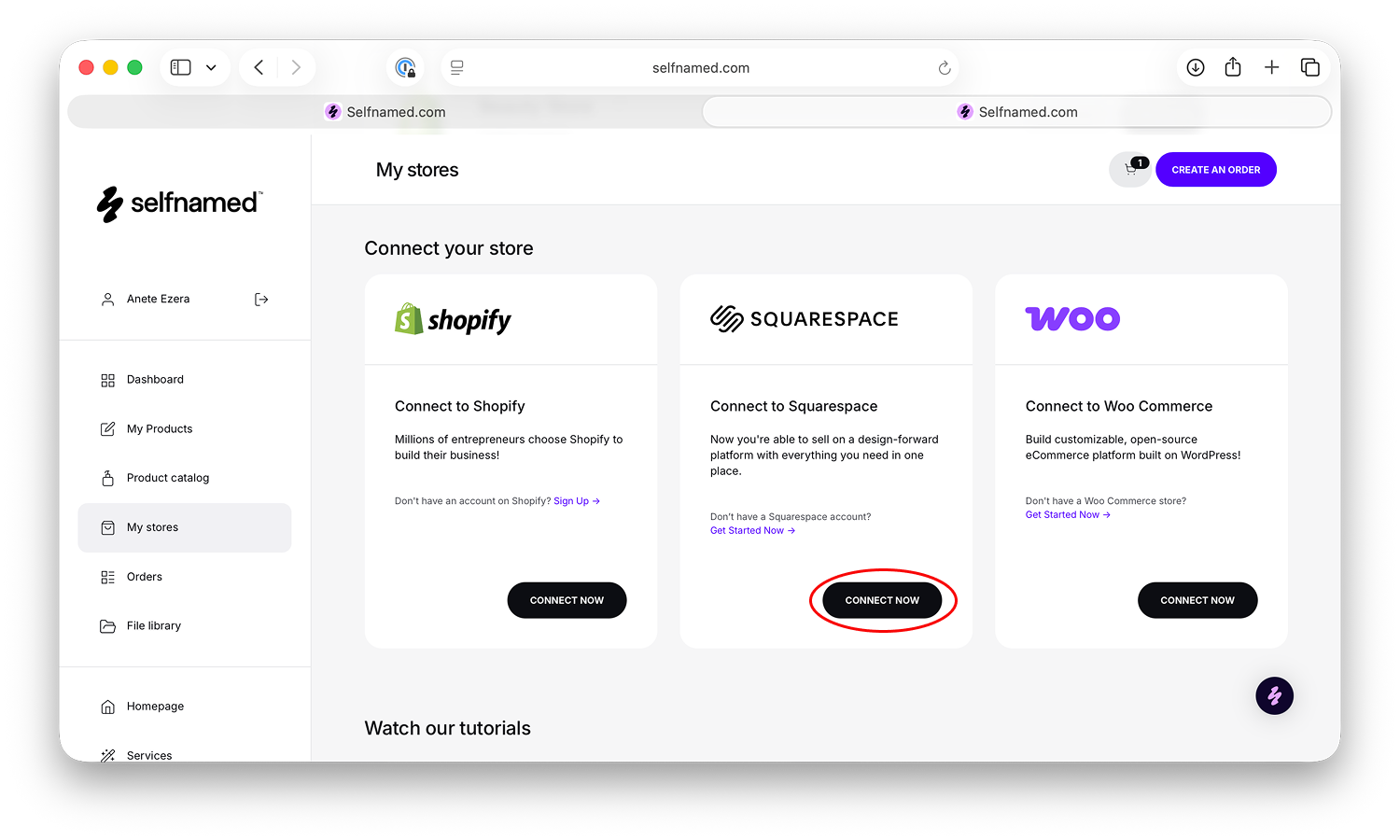
Melden Sie sich mit Ihren Zugangsdaten bei Ihrem Selfnamed-Konto an und navigieren Sie zu Ihrem Profil-Dashboard. Wählen Sie dort „Meine Shops“, um einen neuen Shop hinzuzufügen. Suchen Sie die Option „Squarespace“ und klicken Sie auf „Jetzt verbinden“, um die Integration zu starten. Bevor Sie fortfahren, werden Sie gebeten, die Nutzungsbedingungen für Dropshipping zu lesen und zu akzeptieren. Nach der Annahme wählen Sie die Squarespace-Website, die Sie verbinden möchten, und bestätigen Sie die Verbindung, indem Sie „Zulassen“ auswählen. Sie werden dann zurück zu Selfnamed weitergeleitet, wo Ihr Squarespace-Shop als sicher verbunden angezeigt wird.


Schritt 02: Zahlungsmethode hinzufügen

Zahlungen für Ihren Squarespace-Shop einrichten


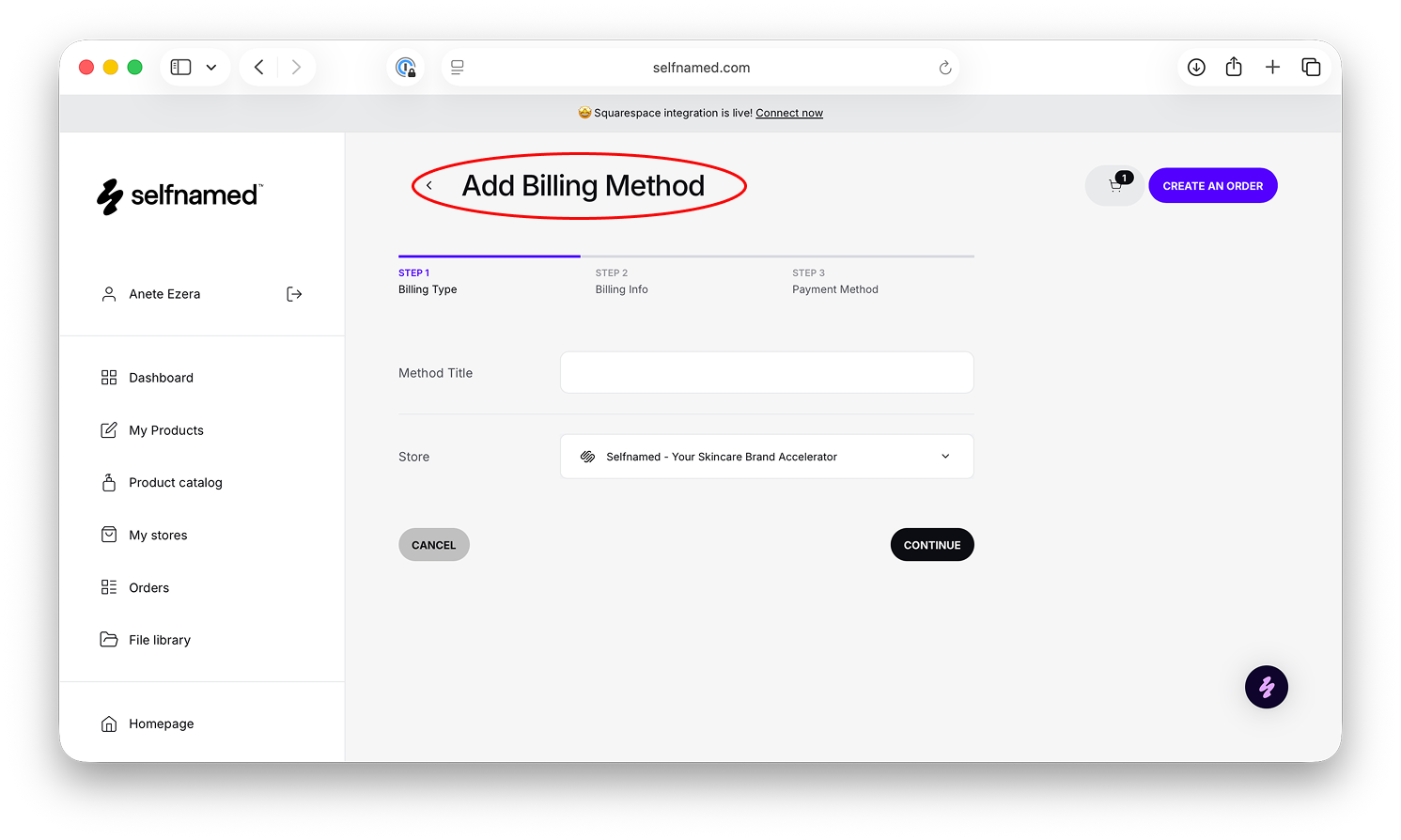
Bevor Sie mit dem Verkauf beginnen können, müssen Sie Zahlungsinformationen hinzufügen, um die Produkt- und Versandkosten für jede Dropshipping-Bestellung abzudecken. Gehen Sie in Ihrem Selfnamed-Dashboard zu „Mein Profil“, öffnen Sie den Abschnitt „Zahlung“ und klicken Sie dann auf „Zahlungsmethode hinzufügen“. Geben Sie einen Namen für die Zahlungsmethode ein und wählen Sie den Squarespace-Shop aus, für den sie gelten soll. Geben Sie als Nächstes Ihre Rechnungsdaten ein und wählen Sie Ihre bevorzugte Zahlungswährung aus. Geben Sie Ihre Zahlungskartendaten ein und speichern Sie sie, um die Einrichtung abzuschließen. Nach dem Speichern wird die Zahlungsmethode in Ihrem Abschnitt „Rechnung“ angezeigt und Ihr Squarespace-Shop ist bereit, Bestellungen zu bearbeiten.


Schritt 03: Produkte hinzufügen und synchronisieren

Produkte hochladen und alles synchronisieren


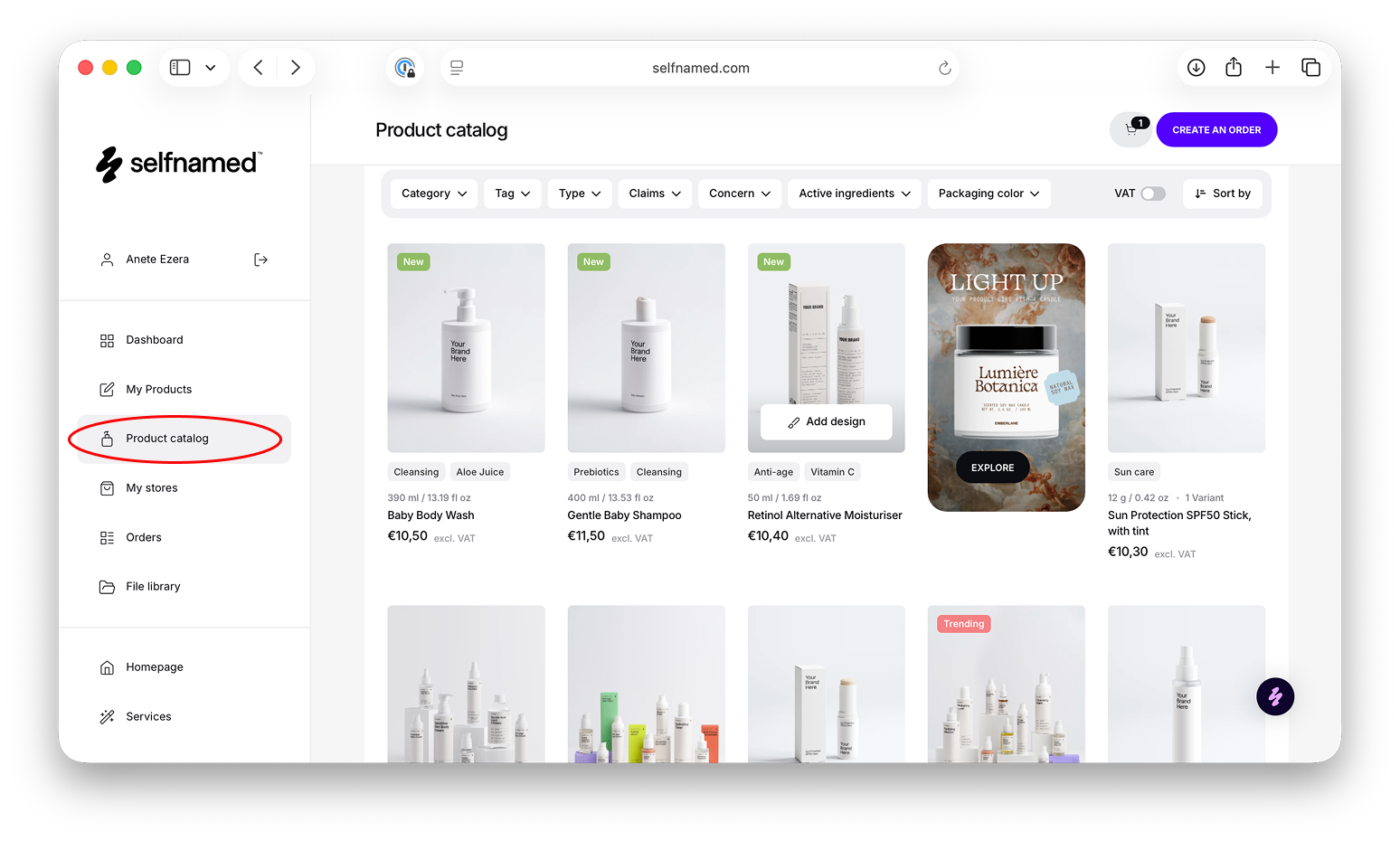
Um mit dem Verkauf zu beginnen, erstellen Sie ein neues Produkt aus dem Selfnamed-Produktkatalog oder wählen Sie eines aus „Meine Produkte“ aus. Wählen Sie ein Produkt aus, erstellen oder wählen Sie ein Design und fügen Sie es Ihrem Shop hinzu. Wählen Sie die Squarespace-Website aus, geben Sie dann den Produktnamen, den Preis und die Beschreibung ein, die automatisch synchronisiert werden und später bearbeitet werden können. Wählen Sie Mockup-Bilder als Produktfotos aus und bestätigen Sie die Veröffentlichung.

Sobald Ihr Produkt live ist, bleibt alles automatisch synchronisiert. Bestellungen, die in Ihrem Squarespace-Shop aufgegeben werden, werden in Selfnamed zur Bearbeitung angezeigt, und Versandaktualisierungen und Sendungsverfolgungsdaten werden an Squarespace zurückgesendet. Sie können auch jederzeit Änderungen vornehmen, indem Sie Designs oder Mockups in Selfnamed aktualisieren und synchronisieren, sodass beide Plattformen perfekt aufeinander abgestimmt bleiben.
 

Squarespace

Schritt 01: Verbinden Sie Ihren Shop

Squarespace mit Selfnamed integrieren


Melden Sie sich mit Ihren Zugangsdaten bei Ihrem Selfnamed-Konto an und navigieren Sie zu Ihrem Profil-Dashboard. Wählen Sie dort „Meine Shops“, um einen neuen Shop hinzuzufügen. Suchen Sie die Option „Squarespace“ und klicken Sie auf „Jetzt verbinden“, um die Integration zu starten. Bevor Sie fortfahren, werden Sie gebeten, die Nutzungsbedingungen für Dropshipping zu lesen und zu akzeptieren. Nach der Annahme wählen Sie die Squarespace-Website, die Sie verbinden möchten, und bestätigen Sie die Verbindung, indem Sie „Zulassen“ auswählen. Sie werden dann zurück zu Selfnamed weitergeleitet, wo Ihr Squarespace-Shop als sicher verbunden angezeigt wird.


Schritt 02: Zahlungsmethode hinzufügen

Zahlungen für Ihren Squarespace-Shop einrichten


Bevor Sie mit dem Verkauf beginnen können, müssen Sie Zahlungsinformationen hinzufügen, um die Produkt- und Versandkosten für jede Dropshipping-Bestellung abzudecken. Gehen Sie in Ihrem Selfnamed-Dashboard zu „Mein Profil“, öffnen Sie den Abschnitt „Zahlung“ und klicken Sie dann auf „Zahlungsmethode hinzufügen“. Geben Sie einen Namen für die Zahlungsmethode ein und wählen Sie den Squarespace-Shop aus, für den sie gelten soll. Geben Sie als Nächstes Ihre Rechnungsdaten ein und wählen Sie Ihre bevorzugte Zahlungswährung aus. Geben Sie Ihre Zahlungskartendaten ein und speichern Sie sie, um die Einrichtung abzuschließen. Nach dem Speichern wird die Zahlungsmethode in Ihrem Abschnitt „Rechnung“ angezeigt und Ihr Squarespace-Shop ist bereit, Bestellungen zu bearbeiten.


Schritt 03: Produkte hinzufügen und synchronisieren

Produkte hochladen und alles synchronisieren


Um mit dem Verkauf zu beginnen, erstellen Sie ein neues Produkt aus dem Selfnamed-Produktkatalog oder wählen Sie eines aus „Meine Produkte“ aus. Wählen Sie ein Produkt aus, erstellen oder wählen Sie ein Design und fügen Sie es Ihrem Shop hinzu. Wählen Sie die Squarespace-Website aus, geben Sie dann den Produktnamen, den Preis und die Beschreibung ein, die automatisch synchronisiert werden und später bearbeitet werden können. Wählen Sie Mockup-Bilder als Produktfotos aus und bestätigen Sie die Veröffentlichung.

Sobald Ihr Produkt live ist, bleibt alles automatisch synchronisiert. Bestellungen, die in Ihrem Squarespace-Shop aufgegeben werden, werden in Selfnamed zur Bearbeitung angezeigt, und Versandaktualisierungen und Sendungsverfolgungsdaten werden an Squarespace zurückgesendet. Sie können auch jederzeit Änderungen vornehmen, indem Sie Designs oder Mockups in Selfnamed aktualisieren und synchronisieren, sodass beide Plattformen perfekt aufeinander abgestimmt bleiben.


Sie haben Fragen?

Im Bereich „Häufig gestellte Fragen“ finden Sie die Antworten zu allen relevanten Themen.

Kontaktieren Sie uns per E-Mail

Sie können uns gerne direkt kontaktieren – unsere Kundenbetreuung wird sich mit Ihnen in Verbindung setzen!